Othello game flow
Mini Arcade · Based on src/othello.c, its controls in src/main.c and shared AI timing.
Screen captures
Views of this part running on the Mini Arcade.
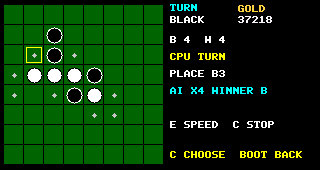
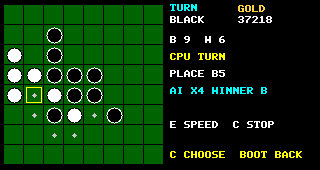
Overall game flow
Read from top to bottom. Branches show conditions and the next destination.
- Open Othello from Games
startOthello(): load saved results, reset the board and select default AI speed X4. - Show saved scoresDisplay wins, losses, draws and winning streak.
After two seconds, or A / K, continue to selection. - Choose BLACK, WHITE or AUTOD / B / joystick cycles the choices. A / K starts.
BLACK is selected initially. - Begin gameClear the 8 × 8 board and place the four centre pieces.
Black moves first. Build the legal-move list.
In AUTO, randomly choose the colour eligible to earn AI Gold. - Whose turn is it?Human turnD / B / joystick cycles only legal moves. A / K confirms the selected move.Computer turn, or either colour in AUTOWait until the move timer expires, then choose a move using positional weights and capture count.
- Perform moveValidate the selected move, flip enclosed opponent pieces in all eight directions and place the new piece.
- Can the opponent move?YesSwitch current player. Refresh legal moves, update the message and schedule the next computer move. Return to Whose turn is it?NoCheck whether the current player can move again; continue below.
- Can the current player still move?Yes — pass opponent's turnKeep the current player, refresh legal moves and show a pass message. Return to Whose turn is it?No — neither side can moveCount black and white pieces. The higher count wins; equal counts produce a draw. Enter FINISHED.
- Record the resultUpdate human results and save when permitted, or award AI Gold for the designated colour's win. See result handling below.
- How does the next game start?Human gameA / K returns to Choose BLACK, WHITE or AUTO.AUTO gameDisplay the restart countdown. After the shared restart delay, return to Begin game automatically.
Rendering: drawOthello() displays the current state after updates: selection or saved scores, or the board with pieces, legal-move dots, selected square, turn, counts, result and status.
Other routes: C returns to colour/mode selection, including during an unfinished game. E cycles AUTO speed through X1, X2, X4 and X8. BOOT leaves Othello and calls stopOthello().
How a move captures pieces
legalMove() and makeMove() both use countFlips().
- Is the candidate square empty?If occupied, the move is illegal.
- Check a direction from the squareInspect the adjacent square, then follow the line of opponent pieces.
- Does at least one opponent piece end at your own piece?YesThat direction captures all opponent pieces between the empty square and your existing piece.NoAn empty square, board edge or lack of adjacent opponent pieces means no capture in that direction.
- Repeat for all eight directionsHorizontal, vertical and diagonal.
- Any direction captures pieces?Yes — legal moveWhen played, flip every captured line and place your piece.No — illegal moveExclude this square from the legal-move list.
How the computer chooses a move
- Score every legal moveScore = square's positional weight + three times the number of pieces flipped.
- Find the best scoreCorners have weight 120; some squares near corners have negative weights.
- Build a shortlistKeep all moves scoring at least best score minus eight.
- Randomly choose from the shortlistPass the selected move to
performMove().
This AI evaluates the immediate board position and captures. It does not search ahead through future turns.
Results, rewards and timing
| Situation | Current implementation |
|---|---|
| Human wins | Increase wins and streak; award 35 Gold. |
| Human loses | Increase losses; reset streak to zero. |
| Draw in human mode | Increase draws; reset streak to zero. |
| AUTO result | Award 35 AI Gold only if the randomly designated colour wins. Human results are unchanged. |
| Saving results | Human results are saved only when loading returned OK or not found. Other load errors prevent overwriting the stored results. Save failures are shown on screen. |
| Computer in human mode | Next computer move is scheduled after 800 ms. |
| AUTO timing | Shared base move delay divided by the speed multiplier. Default selection is X4. With the default 1,500 ms base, this is 375 ms per move. |
| AUTO restart | Uses the shared restart setting; default is five seconds. |
| Input selection | Move selection cycles through legal squares rather than moving freely around the board. Joystick input requires centring before navigation. |