Controller Test
Screen captures
Views of this part running on the Mini Arcade.
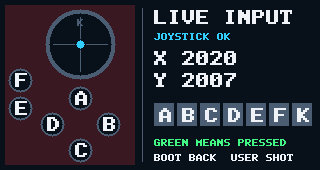
Live input display
- Open Settings → Controller Test
This screen is implemented in main.c, rather than a separate controller_test.c file.
- Read and debounce inputs
The main loop tracks the seven shield button levels and reads live joystick X/Y through controller_input_read().
- Is the joystick reading valid?
Valid: show raw X/Y values and the position dot. Invalid: show ADC READ ERROR and ERR in the joystick view.
- Draw button states
Active-low buttons show green when pressed. Unknown levels use amber. Draw the controller layout and all seven button indicators.
- Present the frame
draw_controller_view() renders into the shared framebuffer; draw_frame() presents it.
- Repeat or leave
Repeat while the Controller Test screen is selected. BOOT returns through the shared navigation.